Calendar 2027 Planner - Kdp Interior
Need a polished, production-ready interior for your 2027 planner — fast, flexible, and built for real-world use? The Calendar 2027 Planner - Kdp Interior delivers exactly that: a professionally formatted, print-optimized digital package designed for creators who value time, control, and quality over guesswork.
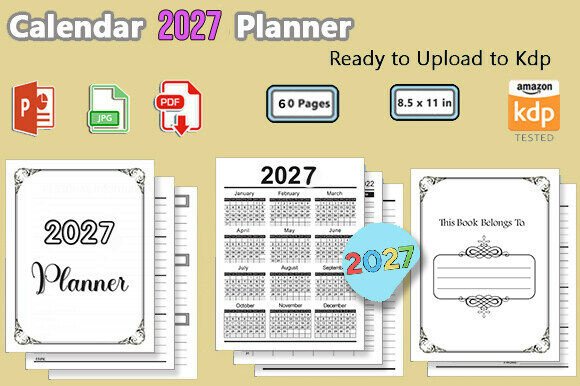
This isn’t a template you’ll spend hours tweaking just to meet KDP’s technical requirements. It’s a tested, no-fuss interior — 60 pages, 8.5 x 11 inches, 300 DPI — ready to upload as-is or customize with precision. Whether you’re launching your first low-content book or scaling a seasonal planner series, this package removes friction from the publishing workflow without sacrificing polish.
What You Actually Get — And Why It Matters
The Calendar 2027 Planner - Kdp Interior includes three essential file types — each serving a distinct purpose in your publishing process:
- PDF (.pdf): A print-ready interior file, fully KDP-compliant — no bleed, correct margins, CMYK-safe colors, and optimized for crisp black-and-white or color printing.
- PPTX (.pptx): A fully editable version in Microsoft PowerPoint. Swap fonts, adjust spacing, insert logos, localize holidays, or rebrand headers — all without design software or technical overhead.
- JPGs (.jpg): 36 high-resolution page exports (one per month spread + key cover/section pages), ideal for mockups, social previews, or quick client approvals.
Every file is sized precisely for KDP’s 8.5" x 11" trim, with consistent gutters and bleed-free layout — meaning fewer rejection loops, faster approval, and predictable print results. It’s been tested on KDP’s latest previewer and live print runs, so what you see is what ships.
Who Uses This — And How It Fits Real Workflows
Professionals don’t buy planners — they buy *leverage*. Here’s how different users apply the Calendar 2027 Planner - Kdp Interior in practice:
Freelancers & solopreneurs bundle it with service packages — e.g., “Brand Strategy + 2027 Content Calendar” — using the PPTX to add their own branding, quarterly goals, or client-specific milestones. One designer told us she inserts her project timeline grid into the January spread, then exports it as a branded PDF for client onboarding.
Educators and trainers adapt the monthly layouts for lesson planning or student goal tracking. With PowerPoint editing, they overlay curriculum standards, add reflection prompts, or convert spreads into printable weekly checklists — all without licensing fees or font embedding headaches.
Bloggers and content creators use the JPG files to build Instagram carousels (“How I Plan My Q1 Content”) or embed static calendar visuals in email newsletters. Because the files are high-res and clean-lined, they scale well across digital and printed collateral.
Small publishers and POD studios treat this as a modular building block — combining it with custom covers, habit trackers, or resource appendices to create differentiated planner lines. Since the interior is pre-tested, they reduce QA time by ~70% compared to building from scratch.
Design Strengths That Go Beyond Aesthetics
Good low-content interiors do more than look clean — they support action. The Calendar 2027 Planner - Kdp Interior balances structure and flexibility:
- Each month spread features a spacious calendar grid (Sundays start the week, per U.S. standard), with room for notes, priorities, or recurring reminders — not just dates.
- Minimalist typography ensures readability at any print size, while subtle line weights and consistent spacing prevent visual fatigue during daily use.
- No decorative flourishes that eat up ink or distract from functionality — but enough white space to invite writing, sketching, or sticker use.
- All text is vector-based in the PDF and fully editable in PowerPoint, so resizing or repositioning won’t blur or pixelate.
It’s also intentionally neutral: no pre-filled quotes, dated affirmations, or niche themes. That means you decide whether it becomes a productivity tool, a creative journal companion, or a branded corporate gifting item — without fighting the design.
Practical Considerations Before You Launch
While the Calendar 2027 Planner - Kdp Interior streamlines production, keep these realities in mind:
- Double-check regional date formatting: The default uses U.S. month/day/year order and English weekday names. If targeting non-U.S. markets, open the PPTX and update language, holidays, or calendar start days before exporting final files.
- Test print on your target paper stock: Though optimized for standard 60–70 lb text weight, heavier paper may affect margin visibility. Run a single-page test print to verify gutter clearance and corner alignment.
- Pair thoughtfully with your cover: Since the interior has no bleed, ensure your cover design accounts for exact 8.5" x 11" trim dimensions — especially if using full-bleed cover art. Misaligned covers are the #1 avoidable cause of KDP rejections.
- Update metadata, not just files: Even with a perfect interior, your KDP listing needs accurate title, description, and backend keywords — like “2027 monthly planner printable,” “editable KDP planner interior,” or “low content calendar book.” Don’t assume the file alone drives discoverability.
And one final note: This package is for *digital distribution and print-on-demand*, not resale of source files. You retain full rights to publish and sell books built from it — but redistribution of the PPTX or JPGs as standalone assets violates usage terms.
Where This Fits in Your Publishing Toolkit
The Calendar 2027 Planner - Kdp Interior isn’t meant to replace strategy — it replaces busywork. It saves hours of formatting, testing, and troubleshooting so you can focus on what matters: your audience, your message, and your next launch. Whether you’re building a seasonal planner brand, supporting clients with tangible tools, or expanding your low-content catalog with confidence, this interior gives you a consistent, professional foundation — no design degree required.
If you’ve ever delayed a planner launch because of KDP formatting stress — or scrapped a draft after three failed preview renders — this is the reset button. Clean files. Clear specs. Real-world tested. Ready when you are.