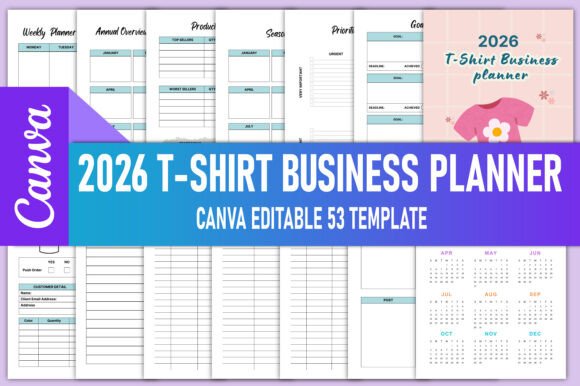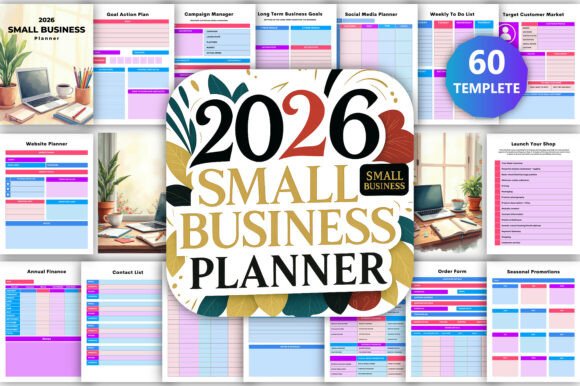
📖 2026 Small Business Planner Canva KDP
Planning isn’t just about writing down tasks—it’s about aligning daily actions with long-term business direction. The 📖 2026 Small Business Planner Canva KDP is built for that alignment: a practical, all-in-one system designed not as a static template, but as an active part of your operational rhythm. It bridges the gap between strategy and execution—whether you’re launching a new product line, managing seasonal campaigns, refining pricing, or scaling client onboarding.
This planner works where many others fall short: it assumes you’re juggling multiple roles—marketer, accountant, inventory manager, customer service lead—all while trying to grow something meaningful. Its structure supports real-world workflows, not idealized ones. You’ll find space for quick notes next to deep-dive analysis, financial tracking beside creative brainstorming, and weekly scheduling alongside quarterly reflection.
How It Fits Into Your Business Workflow
The 📖 2026 Small Business Planner Canva KDP isn’t meant to replace your accounting software or CRM—but it complements them. Think of it as your central operating log: the place where you capture context, connect dots across tools, and maintain continuity between sessions. For example, after reviewing QuickBooks reports, you might log key takeaways in the Income, Expense & Profit Trackers, then draft next month’s cash flow forecast in the Business Overview section. Or after a competitor audit, you’d record insights in the Competitor Analysis pages—and immediately link those observations to upcoming Seasonal Promotions.
Before a project launch, use the Goal Setting Action Plans to break objectives into weekly milestones. During execution, update the Social Media Marketing Planner with live post performance metrics and adjust captions or timing based on what’s resonating. After the campaign ends, reflect in the Monthly Review spreads—comparing planned vs. actual outcomes, noting bottlenecks, and capturing lessons before they fade.
Practical Integration With Other Tools
You don’t need to abandon existing systems to benefit from this planner. In fact, its value multiplies when used *alongside* digital tools:
- Canva integration: The editable Canva link lets you personalize branding, swap fonts, add logos, or adjust layouts without design expertise. This matters when consistency across client-facing materials—like pitch decks or social graphics—supports credibility.
- Accounting software: Use the PDF profit trackers to reconcile monthly numbers manually—or cross-check automated reports. The dual-column expense log helps spot discrepancies early, especially if you’re tracking subcontractor payments or recurring SaaS costs.
- Inventory platforms: Even if you use Shopify or Square for stock management, the Product Inventory Management section serves as a lightweight backup and decision log—recording why you raised prices, paused a SKU, or reordered at a specific volume.
- Communication tools: When a customer emails with a return request, log it in the Order, Return & Contact Logs—including date, issue type, resolution, and follow-up needed. That builds a searchable history faster than scrolling through Slack or Gmail threads.
This level of integration depends less on technical setup and more on habit: dedicating five minutes each morning to update one section, or using Friday afternoons to review two spreads side-by-side (e.g., Social Media Planner + Brainstorming Ideas Pages) to generate fresh content angles.
Using It Across Timeframes—Not Just Calendar Months
The 📖 2026 Small Business Planner Canva KDP supports planning at three distinct time horizons—strategic, tactical, and reactive—and helps you shift between them intentionally.
Strategic use happens in the SWOT Analysis and Business Overview sections. These aren’t one-time exercises. Revisit them quarterly—not to rewrite everything, but to annotate changes: “Q2 brought new local competitors; added ‘community partnerships’ under Opportunities.” That kind of living documentation reveals patterns over time.
Tactical use lives in the Monthly Weekly Calendars and Action Plans. Here, specificity matters. Instead of “work on website,” write “update service page copy, test mobile load speed, schedule SEO audit”—then assign each to a week and check off as done. The calendar layout prevents overloading any single day, and the weekly spread gives room to note energy levels, interruptions, or unexpected wins.
Reactive use shows up in the Brainstorming Ideas Pages and Contact Logs. These are low-friction spaces—no formatting pressure, no need to polish. Jot down a podcast guest idea mid-call. Sketch a packaging redesign while waiting for a Zoom meeting to start. Capture a customer complaint verbatim, then flag it for process review later. Their usefulness lies in accessibility—not perfection.
Design Choices That Support Real Work
The inclusion of both editable Canva access and print-ready PDFs isn’t just convenience—it’s workflow flexibility. If you prefer handwriting, the PDFs print cleanly on standard paper or premium planners. If you work digitally, Canva lets you embed links (e.g., to Google Sheets dashboards), insert screenshots of analytics, or paste email snippets directly into relevant sections.
JPG files serve another purpose: visual reference. Print a single page—like the Social Media Planner grid—and tape it to your monitor. Or save the Inventory Tracker as your desktop background for quick glance-ups during order fulfillment. These small adaptations reduce friction between intention and action.
Organization follows function, not aesthetics. Pages group related activities—not by theme (“marketing”), but by outcome (“what do I need to decide *this week*?”). That’s why Seasonal Promotions sits beside Competitor Analysis: timing and positioning are interdependent. Why separate Financial Tracking from Tax Prep Notes? They’re the same cycle, viewed from different angles.
Maintaining Consistency Without Burnout
Consistency doesn’t mean daily entries—it means regular touchpoints aligned to your natural cadence. Some users open the planner every Monday morning. Others use it only during monthly reviews and before major launches. What matters is linking usage to existing habits: reviewing the Weekly Calendar while drinking coffee, updating Profit Trackers right after closing the books, logging competitor moves during industry newsletter reads.
Quality control happens quietly. Because the planner asks for concrete inputs—dates, dollar amounts, stock counts, platform names—it surfaces inconsistencies fast. If your Expense Tracker shows $1,200 spent on ads but your Facebook Ads dashboard says $980, you’ll notice. That gap invites investigation—not frustration.
Long-term use grows easier, not harder. As you fill pages, you build a personal reference library: past campaign dates, average response times, seasonal sales lifts, even rejected product ideas worth revisiting. That institutional memory stays with *you*, independent of apps, subscriptions, or devices.
The 📖 2026 Small Business Planner Canva KDP doesn’t promise effortless success. It offers something more reliable: clarity, continuity, and control—one documented decision at a time.